
Technical Hardware & Software Specifications
Www.MobiFirms.Com
If your Oppo A12 (CPH2083) is completely dead and not responding to power or charging, you may be facing a corrupted or damaged boot area. The best and most reliable solution is to write a full eMMC dump file using a professional flashing tool such as UFI Box or EasyJTAG Plus.
This guide provides the Oppo A12 CPH2083 Full eMMC Dump File—a 100% tested and verified firmware package designed to help you restore dead devices, fix boot issues, and revive hard-bricked phones.
What is an eMMC Dump File?
An eMMC dump file is a complete binary image of the internal storage (ROM) of your phone. It includes all key partitions such as:
- Boot1 & Boot2
- RPMB
- EXT_CSD
- USERDATA
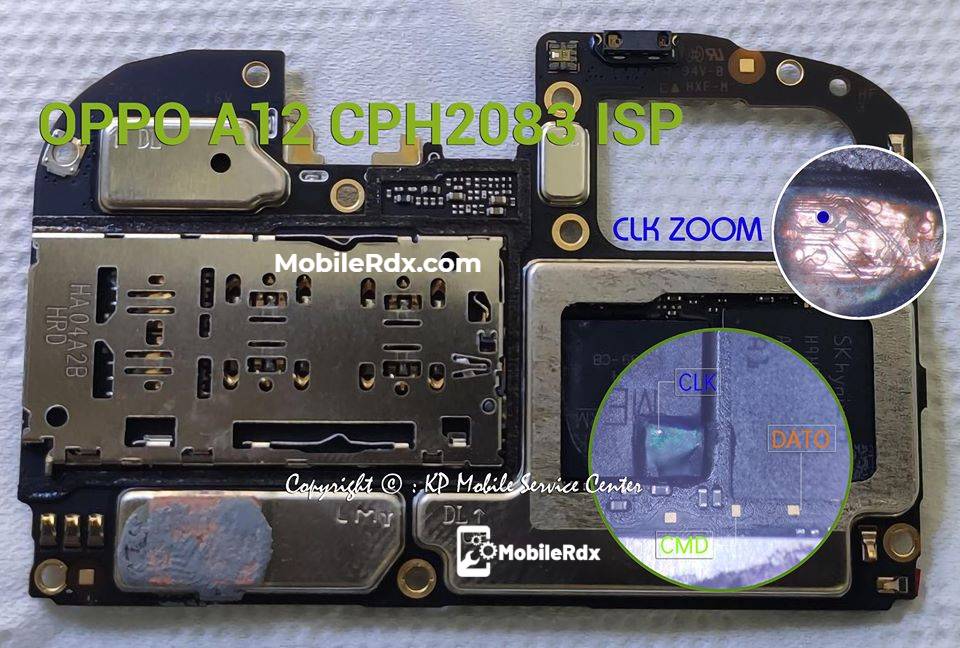
When a phone is dead or not detected by tools like SP Flash Tool or Miracle Box, writing this dump file directly to the eMMC chip through EasyJTAG Plus or UFI Box can bring it back to life.
Why Use the Oppo A12 CPH2083 Full eMMC Dump?
- Fix Dead Boot / No Power Issue
- Recover Corrupted Firmware or Bootloader
- Solve Unknown Baseband or IMEI Null Issues
- Revive Phones Not Detected in Flash Mode
This dump is extracted from a working Oppo A12 (CPH2083) and verified for hardware compatibility. It ensures the most accurate and safe recovery process.
Required Tools
To flash this file successfully, you’ll need:
- UFI Box or EasyJTAG Plus
- Good eMMC Socket or ISP Connection
- Stable Power Source and Clean Board Points
- Official Oppo A12 CPH2083 eMMC Dump File (available for download on MobiFirms.com)
How to Flash Oppo A12 CPH2083 Full eMMC Dump
- Connect the eMMC chip using ISP or adapter to your UFI Box.
- Open UFI eMMC Tool or EasyJTAG software.
- Load the dump partitions (BOOT1, BOOT2, USERDATA).
- Erase existing data, then write the new dump file.
- After completion, reassemble and power on the device.
Your Oppo A12 should now boot normally. If not, perform a format and firmware flash via SP Flash Tool.
Important Notes
- Always back up the original dump before writing.
- Verify eMMC ID before flashing.
- Use tested ISP pinouts to avoid damage to pads.
- Do not interrupt the write process.
Download Oppo A12 CPH2083 Full eMMC Dump
👉 100% tested and verified dump for complete restoration.
Conclusion
By using the Oppo A12 CPH2083 Full eMMC Dump File, you can bring dead or bricked phones back to life. Whether you use UFI Box or EasyJTAG Plus, this tested dump gives you the safest route to recover your device.
🔧 Get your Oppo A12 working again today — Download the full eMMC dump now!
⚡ Standard Flashing Requirements & Instructions
Prerequisites
- ✓ Charge device battery to at least 50%
- ✓ Use original OEM USB cable
- ✓ Backup all personal data & contacts
- ✓ Install proper USB / VCOM / Fastboot Drivers
Important Notice
Flashing factory firmware will erase all user data. Ensure you have verified your device model number and build code match before starting.
| Select / Version | Region | Size | Date Added | Action |
|---|---|---|---|---|
|
✓
v1.0
Latest
|
Global | 3GB | Feb 15, 2026 | Download |