
Archive Size
150MB
Target OS
2.5.0
GEO Region / CSC
Global
Community Rating
5.0
(1)
Select Target Binary Build / Firmware Version (3 Available)
Click any binary version below to instantly update the download & purchase buttons.
✓
Latest
•
Unlocked ✓
$
FREE
Technical Hardware & Software Specifications
Brand / Manufacturer
Special Files
Build Number / PDA
Official Factory Build
Android Version
2.5.0
Region / Market Code
Global
Package Structure
Factory Flash Archive (.zip / .tar)
Verification & Safety
100% Virus-Free & Tested
PWNED DFU uFixer Eraser iPhone A12, A13 Free
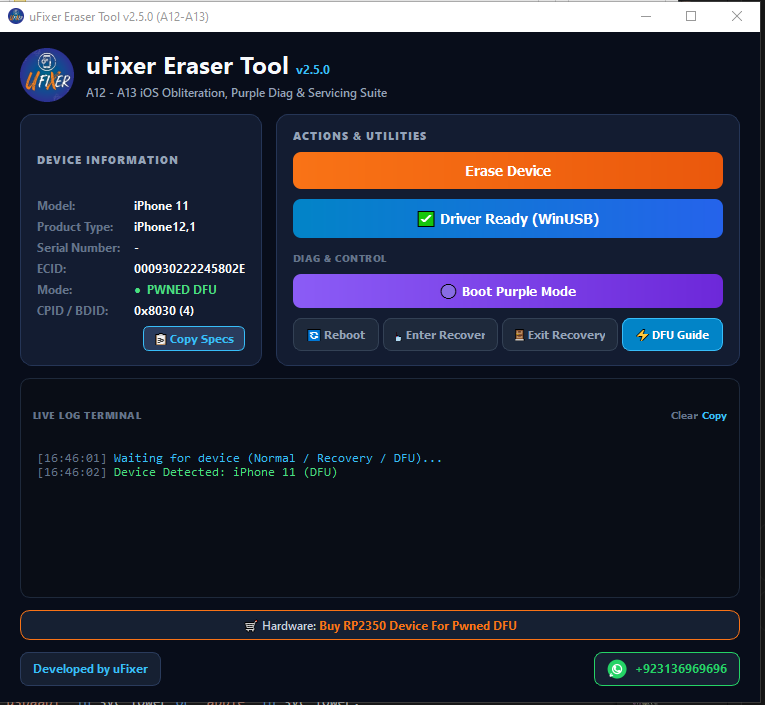
🔥 What’s New & Key Features in v2.5.0:
⚡ 1. Smart 1-Click USB Driver Repair Engine
- Instant Silent Driver Repair: Resolves Apple DFU driver issues (
VID: 05AC,PID: 1227) silently in 1 second. - Context-Aware Dynamic Driver Status: Smart button automatically updates based on your USB connection:
⬇️ Downgrade Driver— Apple Driver Lock Detected🔄 Reinstall Driver— WinUSB Active🔧 Install Driver— Normal / Recovery Mode
📱 2. 100% Full A12 Series Support
- iPhone XS | iPhone XS Max | iPhone XR
- iPad mini 5 | iPad Air 3 | iPad (8th gen)
📱 3. 100% Full A13 Series Support
- iPhone 11 | iPhone 11 Pro | iPhone 11 Pro Max | iPhone SE (2nd gen)
📥 4. 1-Click Recovery Mode Controls
- Enter Recovery: Instantly puts Normal Mode devices into Recovery Mode using exact UDID targeting.
- Exit Recovery / Reboot: Quick 1-click reboot to regular iOS.
🟣 5. Boot Purple Diag Mode
- Integrated
0x8020&0x8030kernel payloads to boot devices directly into Purple Diag Mode for Serial Number & SysCfg modification.
📟 6. Live Terminal Log & Audio Feedback
- Dark-themed live terminal log with timestamped progress monitoring, 1-click log copy, and sound effects for operation success/failure.
⚡ 7. Built-in Interactive DFU Helper Guide
- Step-by-step visual instructions + Guided Audio Countdown Timer (10s / 5s / 5s) with sound cues so you can enter DFU Mode effortlessly.
🔍 8. Triple-Layer Multi-Mode Auto-Detector
- Instant real-time auto-detection across Normal Mode, Recovery Mode, and PWNED DFU Mode.
🛍️ Hardware & Official Support
- 🛒 Buy RP2350 Hardware Board for Pwned DFU: bzar.pk/development-board
- 📺 YouTube Channel: youtube.com/ufixer
- 💬 WhatsApp Support: +92 313 6969696
⚡ Standard Flashing Requirements & Instructions
Prerequisites
- ✓ Charge device battery to at least 50%
- ✓ Use original OEM USB cable
- ✓ Backup all personal data & contacts
- ✓ Install proper USB / VCOM / Fastboot Drivers
Important Notice
Flashing factory firmware will erase all user data. Ensure you have verified your device model number and build code match before starting.
Tags:
#uFixer Eraser Tool
#uFixer Eraser Tool v1.0.0
#A12 iOS eraser tool
#A13 iOS eraser tool
#iPhone 11 factory reset tool
#iPhone XS obliteration tool
#RP2350 Pwned DFU eraser
#iPhone XR erase tool
#iPhone 11 Pro Max Pwned DFU eraser
#iPhone SE 2nd gen erase tool
#iPad Air 3 iOS eraser
#iPad mini 5 factory reset
#iOS A12 A13 oblit-inprogress
#usbliter8_boot tool
#uFixer GSM repair tool download
#RP2350 development board Pwned DFU